TATATECH Crew Website
Workforce app for shift teams

Every shift, handled.

Schedule, clock in, pay and report from one app. Works on any phone, tablet or computer, even without a signal.

Start free
Narrated product tour · 2:13 · captions on screen
Free up to 10 people7 languagesOffline-readyInstallable app
9 modulesSchedule to support, one login
3 ways to verifyFace ID or fingerprint, selfie, PIN
5 export formatsPDF, Excel, CSV, JSON, print
7 languagesInterface and AI assistant
What it does

From the first shift to the last payslip

Crew replaces the group chat, the paper sign-in sheet and the payroll spreadsheet with one app your team actually opens.

01 · SCHEDULING

Build the week in minutes, not afternoons

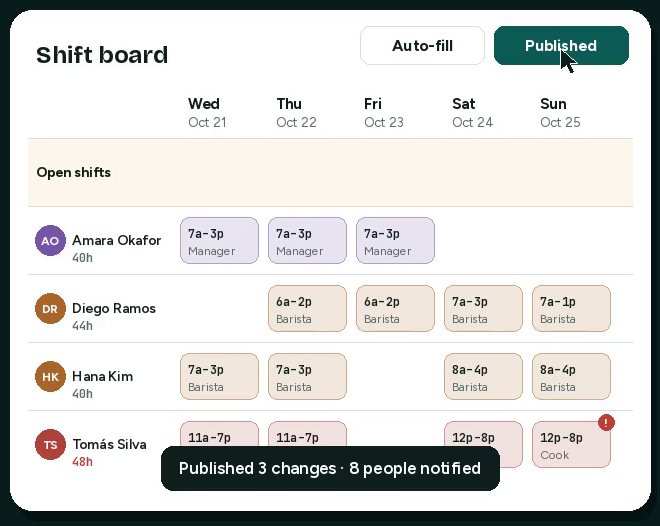
Drag shifts onto a board that checks the rules while you work, then publish once and everyone is notified.

  • Availability, time off, overlaps, rest time and overtime flagged on every edit
  • Auto-fill hands open shifts to eligible people without creating overtime
  • Labor cost and forecast gaps update live on the board
Shift board with draft shifts and an overtime warning
02 · TIME CLOCK

Clock-ins you can trust

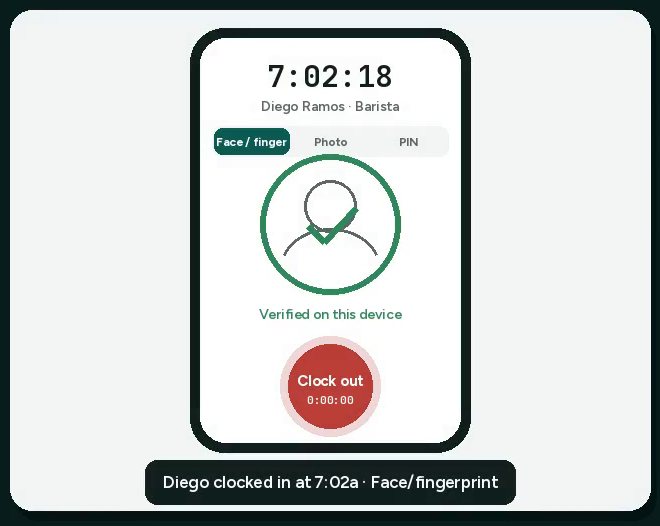
Turn any phone, tablet or computer into a time clock, verified the way that suits your team.

  • Face ID, fingerprint or Windows Hello through the device itself, with no biometric data stored by Crew
  • Selfie verification attached to each timesheet to stop buddy punching
  • PIN for shared kiosks, plus a geofence check at each location
Phone time clock verifying a face and clocking in
03 · OFFLINE

Keeps working when the signal doesn’t

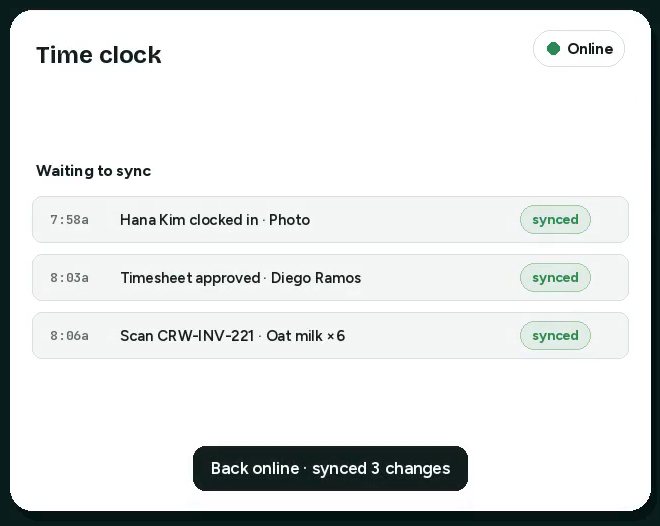
Basements, job sites and delivery routes don’t stop the day. Crew saves every change on the device and syncs on its own.

  • Live online and offline status on every screen
  • Punches, approvals and scans queue safely with timestamps
  • A clear sync confirmation when the connection returns
Offline banner with three changes waiting to sync
04 · PAYROLL

Approved hours become payroll

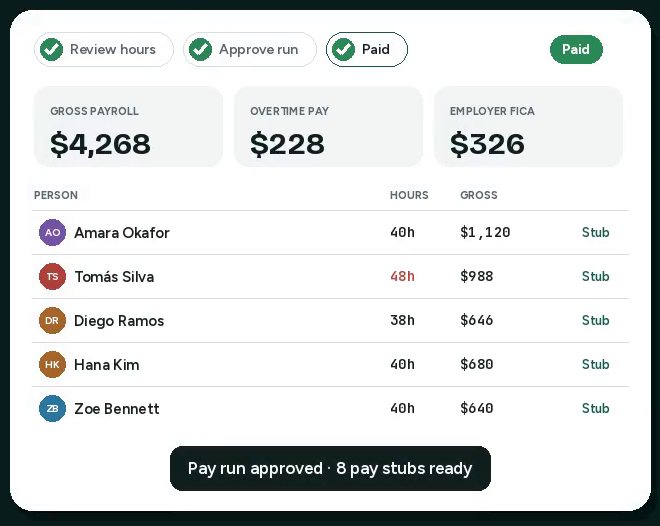
No retyping hours into a spreadsheet. Run a weekly pay run straight from approved timesheets.

  • Overtime at 1.5× after 40 hours, plus bonuses and tips
  • A pay stub for every person and a register you can export
  • Provider-ready CSV for Gusto, ADP, QuickBooks and others
Pay run with gross payroll totals and pay stubs
05 · SCANS & DAILY REPORTS

Scan the day into a report

Inventory counts, equipment checks, deliveries and site check-ins, captured where the work happens.

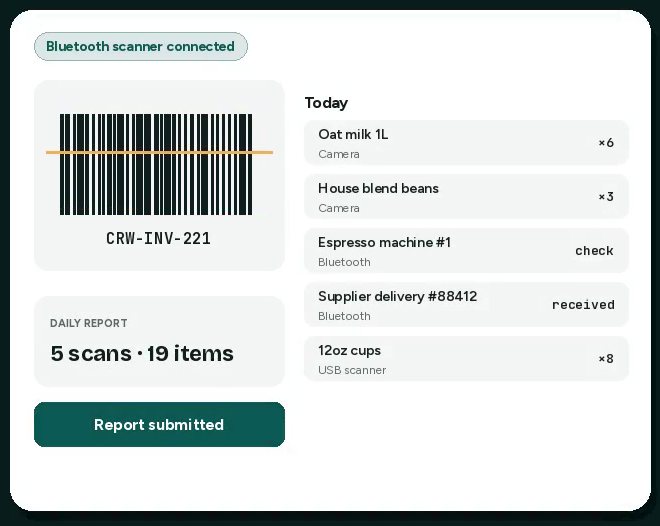
  • Phone camera, photo, USB or Bluetooth barcode and QR scanners
  • Every scan tagged with person, place and time
  • Submit the daily report with notes for the next shift
Barcode scan and a growing list of scanned items
06 · REPORTS

Any report, in any format

Pick a category, narrow the scope, choose the fields and how to group them.

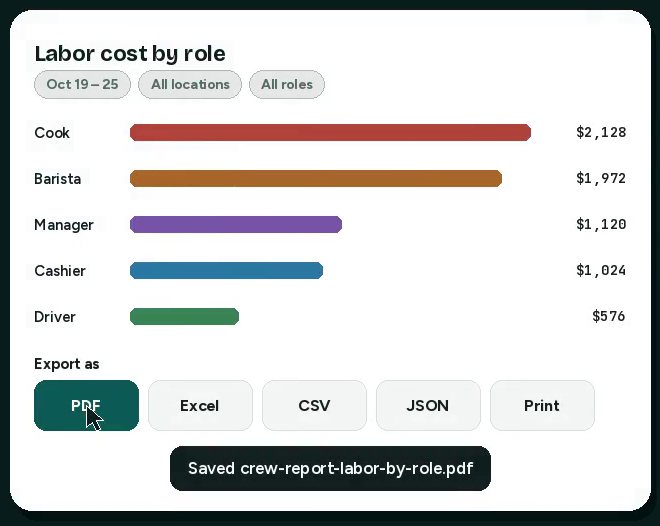
  • Hours, punctuality, labor cost, payroll, coverage, requests, tasks, scans and verification
  • Scope by location, role, person and date range, then save the view
  • Export to PDF, Excel, CSV, JSON or a printable page
Labor cost by role with export formats
07 · CREW AI & SUPPORT

An assistant that speaks your team’s language

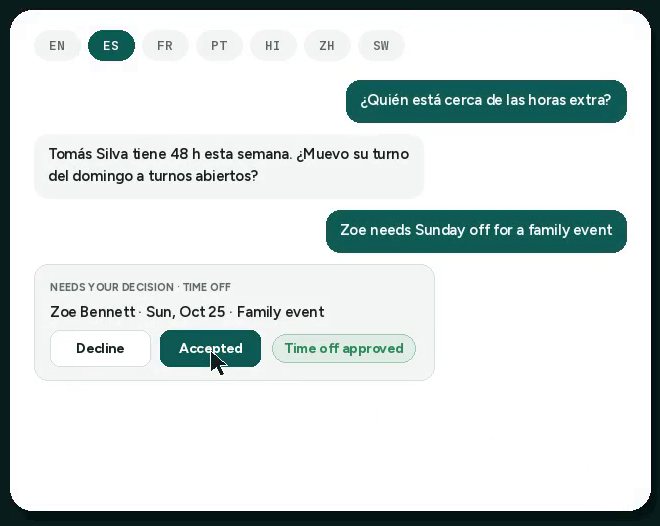
Ask in English, Spanish, French, Portuguese, Hindi, Chinese or Swahili and get answers and actions back in the same language.

  • Manager assistant fills shifts, gives time off and runs reports on request
  • Support bot answers how-to questions and files time-off and swap requests
  • Managers accept or decline requests right inside the chat
Assistant chat in Spanish with an accept request card
Why teams switch

Less admin. Fewer surprises.

Hours back every week

Auto-fill, templates and one-tap publishing replace the back-and-forth of building a rota by hand.

Overtime caught early

Every edit and every swap shows its overtime cost before you approve it, not after payroll.

Honest timesheets

Biometric, photo and PIN verification end buddy punching, and late starts flag themselves.

Payroll without retyping

Approved hours flow into the pay run with overtime and tips already calculated.

Decisions from real data

Scans, hours and costs land in one report builder, ready to share as PDF or Excel.

Everyone on the same page

Announcements with read confirmations, team chat, tasks and a support bot in seven languages.

How it works

Up and running today

1

Add your team

Invite people, set roles, pay rates and availability. Free covers up to 10 people at one location.

2

Build and publish the week

Drag shifts, let auto-fill cover the gaps, then publish. Everyone gets their schedule on their phone.

3

Clock in, approve, pay

Verified punches become timesheets. Approve them and run payroll in a few clicks.

Pricing

Start free. Upgrade as you grow.

Paid plans are billed per active person per month, or 20% less billed annually.

Free

Small teams getting started

$0forever
  • Up to 10 people, 1 location
  • Scheduling, swaps and time off
  • Time clock with photo and PIN
  • Messaging, tasks and scan reports
  • Hours and punctuality reports
Start free

Pro

Growing teams and multiple sites

$3per person / month
  • Unlimited people and locations
  • Face ID / fingerprint clock-in
  • Auto-fill and demand forecasting
  • Full report builder and exports
  • Bluetooth scanners, payroll CSV
Try Pro

Business

Payroll, AI and priority support

$6per person / month
  • Everything in Pro
  • Payroll runs and pay stubs
  • Crew AI assistant in 7 languages
  • Support bot that takes requests
  • Priority support
Try Business
Compare

How Crew stacks up

Based on public product pages and reviews, October 2026. “?” means we could not confirm it publicly, not that it is missing. “–” means a public source says it is not offered.

CapabilityTATATECH CrewCameloDeputyWhen I WorkConnecteamHomebase
Scheduling, swaps, time off✓✓✓✓✓✓
Biometric / photo clock-in✓✓✓???
Demand forecasting✓?✓–??
Overtime preview before approving swaps✓?????
Scan-based daily reports, Bluetooth✓?????
AI assistant in 7 languages✓?????
Free tier✓✓–?✓✓
FAQ

Questions teams ask

Which devices does Crew run on?

Any modern phone, tablet or computer. Install it from the browser to get a home-screen app that opens offline: Chrome or Edge on Android, Windows, Mac and ChromeOS, and Safari on iPhone and iPad.

Do you store fingerprints or face scans?

No. Face ID, fingerprint and Windows Hello checks happen on the device itself. Crew only receives a confirmation that the enrolled person unlocked it. Selfie photos, if you use them, are kept with the timesheet for manager review, and each person gives consent first.

What happens when there is no internet?

Crew keeps working. Clock-ins, approvals and scans are saved on the device with timestamps and sync automatically when the connection returns. The status pill shows what is waiting.

Does Crew file payroll taxes?

Crew calculates gross pay from approved hours, overtime, bonuses and tips, and produces pay stubs and a register. Withholding, net pay and tax filings are handled by your payroll provider from the export.

Which barcode scanners work?

Any USB or Bluetooth scanner that types like a keyboard works everywhere. Bluetooth LE scanners that send text can pair directly in Chrome and Edge. You can also scan with the phone camera.

Which languages are supported?

English, Spanish, French, Portuguese, Hindi, Chinese and Swahili for the interface and the AI assistant.

Run your next shift on Crew

Free for up to 10 people. Set up your team, publish the week and clock in today.

Start free